Unified Ticket Workflow Rubric
Table of Contents
Part I: The Insight
Part II: The Method
- Finding Your Constraint
- Intake and Triage
- The Workflow: A Ticket’s Journey
- Cross-Team Coordination
- When Plans Change
Part III: Knowing It’s Working
- The Feedback Loop
- Buffer and Fever Chart
- The Scorecard
- Four Lenses, One Truth
- The PDCA Connection
- The One Thing to Remember
Appendices
Executive Summary
This rubric moves the team from resource efficiency (keeping everyone busy) to flow efficiency (keeping work moving). Four frameworks unify the approach:
- TameFlow — Manage the constraint; protect it with buffers
- DORA — Measure speed and stability with four key metrics
- ISO 9001 — Ensure quality through repeatable PDCA cycles
- PCI DSS 4.0 — Maintain security in payment-handling environments
Note: The PCI DSS sections apply only to teams handling payment card data. If your team doesn’t process payments, skip those sections—though some best practices apply universally.
All four frameworks address the same root cause: variability. If work were perfectly predictable, none of this would be necessary.
Part I: The Insight
TL;DR Theme: Flow efficiency beats resource efficiency. Key idea: You go faster by starting less, not by working more. Outcome: Teams shift from “stay busy” to “keep work moving.”
1. The One Idea
Flow efficiency beats resource efficiency.
Traditional project management optimizes for keeping everyone busy. This guide optimizes for keeping work moving. The difference sounds subtle but changes everything: how you prioritize, how you measure success, and how you spend your time.
This sounds obvious. Of course you want work to flow. But most organizations prioritize keeping everyone busy—which means giving people more to juggle. When everyone’s working on five things, each one takes longer to finish.
You’ve got 15 tickets in flight, everyone’s busy, and nothing’s shipping. Sound familiar?
This guide explains why that happens and gives you a system to fix it.
You’ll learn the math of variability—why 100% utilization kills throughput—and TameFlow’s constraint-based approach: Drum-Buffer-Rope, fever charts, the Five Focusing Steps. You’ll get an 8-phase workflow from ticket intake to done, with sizing discipline that caps work at DORA’s ≤1 week ceiling. You’ll see how the four DORA metrics connect to Little’s Law, how ISO 9001’s PDCA cycle maps to continuous improvement, and where PCI DSS requirements fit the same pattern.
By the end, you’ll have one habit that ties it all together.
The journey: understand the problem → learn the system → apply the method → measure the results → adjust and repeat.
Let’s start with the problem.
2. The Busy Trap
Traditional project management optimizes for resource efficiency: keeping everyone busy 100% of the time. This seems logical but creates serious problems.
Why does this happen? Goldratt identified the root cause: Cost Accounting. Traditional accounting treats labor as a cost to minimize—”I pay your salary, so you better stay busy.” This drives managers to maximize utilization, which kills flow (as we’ll see below). Cost Accounting optimizes locally (keep each person busy) while degrading globally (everything takes longer).
“Cost Accounting is productivity’s public enemy number one.” (Goldratt, quoted in Tendon & Muller, 2014, Ch. 11)
Queueing Theory 101:
Queueing theory is the mathematics of waiting lines—the study of what happens when “customers” (work items) arrive at “servers” (workers or machines) for processing. It applies anywhere work waits: grocery checkouts, call centers, emergency rooms, and yes—development teams processing tickets.
The key variable is utilization: the fraction of time a server is busy. A developer at 90% utilization is busy 90% of the time. This sounds efficient. It isn’t.
“Queue theory in math tells us that as utilization approaches 100%, lead times approach infinity—in other words, once you get to very high levels of utilization, it takes teams exponentially longer to get anything done.” (Forsgren et al., 2018, lines 1215-1217)
Why Utilization Kills Flow:
This is the hockey-stick curve—response time stays flat at low utilization, then explodes as you approach 100%:
| Utilization | Lead Time Multiplier | What It Feels Like |
|---|---|---|
| 50% | 1x (baseline) | Plenty of slack for variability |
| 75% | 3x | Queue effects emerging |
| 90% | 9x | Severe congestion |
| 95% | 19x | Near gridlock |
| 99% | 99x | Effective standstill |
(Table adapted from Gunther, 2002; formula derivation in Schwartz, 2016, “Calculating Queue Lengths”)
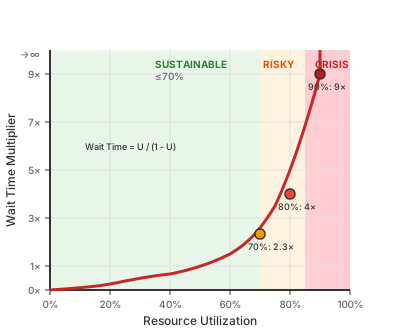
The formula: Wait Time = U / (1 - U) where U is utilization. This ratio is called the stretch factor—it tells you how much response time “stretches” beyond bare service time. At 90%, that’s 0.9 / 0.1 = 9x. This comes from the M/M/1 queueing model—a single server processing jobs that arrive randomly (Jain, 2012, slides 30-3 through 30-8; Schwartz, 2016). Development workflows don’t match M/M/1 exactly (tasks don’t arrive randomly, service times aren’t exponential, we have multiple developers). But the shape of the curve—wait times exploding as utilization approaches 100%—holds across queueing models. The exact multipliers are illustrative; the nonlinear explosion is the point.
The intuition: the denominator (1 - U) is your slack—the capacity left over to absorb variability. A sick day, an urgent request, a task that runs long. At 90% utilization, you have 10% slack. At 99%, you have 1%. When something unexpected happens (and it always does), queues form. With no slack to clear them, they compound.
The Root Cause: Variability
Why does the math work this way? Because real work has variability. Tasks don’t take exactly their estimates. People get sick. Urgent requests interrupt. If everything ran on clock ticks—deterministic, predictable—you could run at 100% utilization with no queues.
But only CPUs run on synchronized clock ticks. The more variability in arrivals or job sizes, the more waste occurs (Schwartz, 2015, line 165). This is Hopp & Spearman’s Law of Variability: “Increasing variability always degrades the performance of a production system” (Hopp & Spearman, Factory Physics, Law #5). The buffer exists to absorb it. WIP limits exist to contain it. The entire system is designed to manage variability, not pretend it doesn’t exist.
Batch Size: The Controllable Variability
One major source of variability is often overlooked: batch size—the scope of each ticket.
Hopp & Spearman’s Law of Move Batching: “Cycle times over a segment of a routing are roughly proportional to the transfer batch sizes” (Law #9). Double the batch size, roughly double the lead time.
When one ticket takes 2 hours and another takes 2 weeks, that’s not just “different tickets”—that’s service time variability. It degrades flow the same way arrival variability does.
DORA is explicit about the ceiling:
“Any batch of code that takes longer than a week to complete and check is too big.” (Forsgren et al., 2018)
Why smaller batches improve flow:
- Faster feedback (catch problems early)
- Lower risk (smaller changes, easier rollback)
- More predictable lead times (less variance)
- Higher motivation (frequent completion)
Practitioners often cite 1-3 days per ticket as a sweet spot (Fuqua, 2015; Kelly, n.d.), and DORA validates that tickets exceeding a week are a warning signal. But time is a proxy, not the thing itself.
The real sizing question: Do you understand what to do?
- “Yeah, we can do it” → Scope is understood; proceed
- “We have no idea” → Scope is undefined; research spike first (Phase 1)
Cognitive load may be a better predictor than elapsed time. A 5-day ticket where the team knows exactly what to build often ships cleaner than a 2-day ticket where nobody understands the problem. But this is a hypothesis, not a settled fact—DORA’s empirical research emphasizes time, while TameFlow emphasizes understanding.
An open question for your team. DORA’s research (thousands of teams) finds batches >1 week correlate with worse outcomes—stated as a hard ceiling. TameFlow argues cognitive load is the real discriminant. Reinertsen’s U-curve framework shows batch size has an optimal range (transaction cost vs holding cost), not “always smaller.”
This is an opportunity for discovery. Track both:
- Time: How long did this batch take?
- Cognitive load: Did we understand what to do upfront?
- Outcome: Did it ship cleanly? Require rework?
After a quarter, examine your data. Does time or cognitive load better predict success for YOUR team? This is PDCA applied to your own process.
The developer’s tension: Engineering-minded developers often see a “right” solution that’s larger and more maintainable. But development concerns—quality, security, maintainability—add processing time for good reason. They prevent future problems. The question isn’t “quality vs speed”—it’s “is this ONE thing done thoroughly, or MULTIPLE things bundled together?”
If one thing: that’s the ticket size. Do it right. If multiple things: decompose. Do each one right.
See Phase 2 (Sizing) for the practical decision procedure.
Before/After:
| Scenario | Resource Efficient Team | Flow Efficient Team |
|---|---|---|
| WIP per dev | 5-6 items | 1-2 items |
| Utilization | 95% | 70% |
| Bug fix time | 2 weeks | 2 days |
| Context switches/day | 8+ | 1-2 |
| Feeling | “Always busy, never done” | “Calm, shipping” |
A 2-day fix becomes a 2-week ordeal when everyone’s at 95% utilization. Not because people are slow, but because everything waits in queues.
The Paradox: You can look productive while being stuck. Everyone’s busy. Nothing’s shipping.
This is why high-performing teams focus on flow efficiency (how fast work moves through the system) rather than resource efficiency (keeping people busy).
The curve shows the problem—utilization above 80% creates exponentially longer wait times. But knowing the problem isn’t enough. You need levers to control it.
3. The Three Levers
Little’s Law is the fundamental equation that connects WIP, throughput, and lead time. These are your three levers—pull any one, and the others must follow.
Before the equation, let’s ground the terms in experience:
WIP (Work in Progress): Count the things you’ve started but haven’t finished. Open tickets assigned to you, half-written code, PRs waiting for review, that branch you haven’t touched in a week. That’s your WIP. You can feel it—the mental inventory you carry, the context switch tax when you jump between tasks, the “where was I?” when you return to something half-done.
Throughput: How many things you finish per unit time. Tickets closed per week. Features shipped per month. It’s the rate of done-ness—the pace at which work leaves your system. You feel this too: the satisfaction of closing something out, the momentum when things are shipping. This is operational throughput—the rate of completion.
TameFlow distinction: In Theory of Constraints, “Throughput” has a stricter meaning: Revenue − Totally Variable Costs. This economic throughput focuses not just on finishing work, but on finishing the right work—work that generates value. Flow efficiency (start less) reduces WIP; Throughput efficiency (start right things) maximizes value per unit of constraint capacity.
Flow Time: Elapsed time from commitment to completion. Not effort—wall clock time. A ticket might need two hours of coding, but if it sat in queues for two weeks, its flow time is two weeks. You’ve felt this as a customer: “I submitted this bug report a month ago and it’s still open.”
When does the clock start? When you promise delivery—whether that’s sprint planning, a customer commitment, or moving a ticket to “committed.” Queue time after commitment counts. This is why backlog grooming matters: don’t commit to more than you can deliver, because the clock starts at commitment, not at work-start.
Now the equation:
“Focusing on flow naturally leads us to consider Little’s Law (1961, 2008, 2011), which states the relationship between throughput (TP), WIP, and flow time (FT).” (Tendon & Muller, 2014, Ch. 14, line 104)
Flow Time = WIP / Throughput
If you have 20 things in progress and finish 5 per week, each thing takes 4 weeks on average. Cut WIP to 10, flow time drops to 2 weeks—without working any faster.
This is Little’s Law, proven in 1961 for queueing systems in steady state (Jain, 2012, slide 30-25). Gunther (2007, §1.1) calls it “the one equation you must learn by heart.” Most development workflows fit this model well enough: tickets come in, get worked, and close out. The law says that for such systems, these three variables are locked together. Change one, the others must follow.
See it to believe it: Watch Henrik Kniberg’s 7-minute sticky-note demo. He delivers the same three projects two ways: focused (one at a time) vs. juggling (all three “in progress”). The counterintuitive finding: even a perfect multitasker with zero context-switching cost delivers each item 2-3x slower when juggling—same total output, but customers wait 2-3x longer. Add realistic switching costs? Time to market becomes 5-7x worse and total productivity drops.
“You don’t get to violate math.” —Kniberg
Three levers to reduce lead time:
The equation tells you exactly where to push:
-
Reduce WIP (the numerator)
Fewer things in flight means each thing finishes faster. If your team has 20 items in progress and finishes 5 per week, average flow time is 4 weeks. Cut WIP to 10, and flow time drops to 2 weeks—without anyone working faster.
Filling the gaps: WIP limits apply to active work—tasks competing for your attention. Blocked time (compilation, CI, waiting for LLM output) is different. You can opportunistically work a secondary task during blocks, as long as the primary gets strict priority when it unblocks. The secondary task must absorb all context-switch cost—that’s what keeps the primary’s flow time unchanged. Rule of thumb: only pick secondary work that fits in a 15-minute window. If you have more time, keep choosing small items rather than one large one—stay interruptible.
-
Increase throughput (the denominator)
More work completed per unit time. But you can’t just tell people to “work faster.” Throughput improves by removing blockers: faster builds, clearer requirements, fewer interruptions, better tooling.
-
Find the bottleneck (makes #2 practical)
Here’s the catch: improving throughput anywhere except the bottleneck doesn’t help. If code review is the constraint, faster coding just builds a bigger review queue. The constraint sets the pace for the whole system. Find it first, then improve it.
Spot the bottleneck:
flowchart LR
    subgraph Dev["Development (5 devs)"]
        D1[Ticket A...]
    end

    subgraph Queue["Review Queue"]
        Q1[PR #3]
        Q2[PR #4]
        Q3[PR #5<br/>3 days old]
    end

    subgraph Review["Code Review (2 reviewers)"]
        R1[PR #1]
        R2[PR #2]
    end

    subgraph Done["Done"]
        X1[shipped]
    end

    Dev -- "5/week" --> Queue
    Queue --> Review
    Review -- "2/week" --> Done

    style Dev fill:#e8f5e9
    style Queue fill:#fff3e0
    style Review fill:#ffcdd2
    style Q3 fill:#ef9a9a
Development has capacity. Review is out of capacity, overflowing. The bottleneck isn’t where people are busy—it’s where work piles up. You see this by looking at the buffers in the queueing system: the Review Queue is growing while Development’s queue is empty. Doing more development work here would just create more PRs waiting for review.
The Key Shift:
| Resource Efficiency | Flow Efficiency |
|---|---|
| Keep everyone busy | Keep work flowing |
| Optimize all resources | Optimize the constraint |
| Measure utilization | Measure throughput |
| Big batches (fewer handoffs) | Small batches (faster feedback) |
| Start as much as possible | Finish before starting |
“With focus on the constraint, the TOC favors optimizing the performance of one resource at a time; and not of all resources all the time. The analogy of the chain illustrates this—the whole chain gets stronger only by strengthening the weakest link.” — Theory of Constraints (TOC), Tendon & Muller, 2014, Ch. 11
Find the constraint—the bottleneck that sets the pace for everything else.
4. The TameFlow Approach
Little’s Law gives you the math. TameFlow gives you the system.
You’ve found your constraint—the bottleneck that limits everything. Now: how do you operate around it day-to-day? You need a control mechanism that keeps work flowing through the constraint without overwhelming it.
TameFlow provides this through Drum-Buffer-Rope (DBR), a steering system borrowed from manufacturing and adapted for knowledge work (Tendon & Muller, 2014, Ch. 24).
Drum-Buffer-Rope
The Drum is your constraint’s capacity—it sets the pace for everything.
If PR review is your bottleneck, the drum is how many PRs your reviewers can handle per day. Everything else subordinates to this beat. Starting more features than the drum can process just creates queues; the work piles up waiting for review while developers context-switch between half-finished tasks.
The drum answers: At what rate should work flow through the system?
The Buffer is time reserved to protect the constraint.
This is not slack time for workers to relax. It’s a time cushion ensuring the constraint never starves for work. Variability is inevitable—someone gets sick, a task takes longer than expected, an urgent issue interrupts. Without buffer, these surprises hit the constraint directly and cascade through the system.
Think of buffer as shock absorbers. Section 2 showed that as utilization approaches 100%, wait times explode. Buffer is what keeps you off that cliff. It’s the denominator’s friend—the capacity reserve that absorbs variability before it compounds into delays.
The Rope is a signal that limits upstream work.
The rope connects the constraint back to the start of the workflow. It says: don’t release new work until there’s room in the buffer. This prevents WIP from exploding even when upstream capacity is available.
In development: don’t start new features until the PR queue drops below a threshold. The rope holds back work that would otherwise pile up waiting for review.
The Rope in Practice
The rope is a replenishment signal, not a column WIP limit.
“Every time a task is finished, a team member is allowed to open a new task.” (Tendon & Muller, 2014, Ch. 24)
How it works:
- When work exits the system (merged, deployed), that signals capacity for new work
- The signal propagates upstream: “one out, one in”
- System-wide WIP stays bounded without per-column limits
Why not column WIP limits?
Column WIP limits (e.g., “max 5 in Review”) are Kanban—what Tendon calls “2nd generation” production control. TameFlow uses DBR (“3rd generation”), where WIP is controlled by the constraint, not by artificial limits at each stage:
“In TameFlow-Kanban we will still keep the cards unchanged, but we will forgo the WIP-limited columns… work-state (column) WIP limits hide the real constraint.” (Tendon & Muller, 2014, Ch. 18)
Column limits can create artificial bottlenecks—the column fills up even though the real constraint has capacity. DBR keeps focus on the actual constraint.
In practice:
- Use the Kanban board for visualization (columns, cards)
- Don’t enforce per-column WIP limits
- Instead: when constraint has capacity (buffer isn’t full), pull new work
- Monitor buffer health via fever chart—that tells you when to tighten the rope
- When blocked: don’t pull a new primary ticket to fill the gap (see S3’s “Filling the gaps” for how secondary work can absorb idle time without affecting primary flow)
When to tighten the rope: When the buffer runs “yellow” or “red” (Section 11), stop starting new work. The signal comes from buffer consumption, not from counting items in a column.
What the Rope Doesn’t Control
A natural question arises: if the rope limits work entering the system, what about all the tickets piling up in the backlog? Can’t the backlog grow unbounded?
Yes—and that’s by design. The rope was never meant to control demand.
In manufacturing, customer orders arrive independently of the factory’s capacity. Goldratt’s rope doesn’t reach back to customers placing orders; it reaches to the release of raw materials onto the shop floor. The order book—the queue of accepted orders waiting to start production—sits outside the rope’s scope. Manufacturing deals with excess demand through commercial mechanisms: quoting longer lead times, raising prices, or declining orders.
“Material should be released Not Earlier Than the time calculated by using the CCR Buffer. This concept is called—The Rope—which means chocking the release according to the planned time.” — TOCPA (2015), citing Cohen & Fedurko, Theory of Constraints Fundamentals (2012)
The same applies to software. Tickets arrive from users, stakeholders, and other teams—demand you don’t control. The backlog can grow indefinitely. The rope controls when work is committed (moved to “In Progress”), not when tickets are created.
Why this distinction matters:
The backlog and active WIP are economically different queues:
| Queue | Inventory Cost | Opportunity Cost |
|---|---|---|
| Backlog | Near zero (database rows) | Real (features delayed, context decay) |
| Active WIP | High (developer attention, context switching, blocked capacity) | Real (same as above) |
The rope solves the inventory cost problem—preventing the expensive pile-up of half-finished work consuming developer attention. The backlog problem is an opportunity cost problem, requiring different tools: aggressive triage, prioritization by cost of delay, saying “no” more often, or expanding capacity.
But here’s the connection: Starting more WIP increases lead time for everything in the system (Little’s Law). Longer lead times mean customers wait longer—which is opportunity cost. So while the rope doesn’t control backlog size, it does reduce the lead time of items already committed. Optimizing flow optimizes both costs simultaneously.
In short: DBR keeps your production system healthy and minimizes how long committed work takes. Managing backlog size is a separate concern—but flow optimization reduces the lead time of whatever’s in the backlog by getting to it faster, therefore minimizing the opportunity cost.
How DBR Connects to the Five Focusing Steps
DBR is how you operationalize the Five Focusing Steps from Section 5:
- Identify the constraint → that’s your drum
- Exploit it → protect it with buffer
- Subordinate everything else → use the rope to limit WIP
- Elevate only after subordinating → expand capacity when the system is stable
- Repeat → monitor buffer health to detect when the constraint shifts
The Fever Chart: Your Early Warning System
How do you know if the buffer is healthy? You watch its consumption.
A fever chart plots buffer consumption against project progress:
- X-axis: How much of the work is done (0% → 100%)
- Y-axis: How much buffer you’ve consumed (0% → 100%)
If you’re 50% through the work but have consumed 70% of your buffer, you’re in trouble—running a fever. If you’re 50% through and have consumed only 30%, you’re ahead of pace.
The fever chart becomes your early warning system (Tendon & Muller, 2014, Ch. 25). Part III (Section 11) explains how to read it in detail; for now, understand that buffer consumption is the vital sign that tells you whether flow is healthy or sick.
Manager Summary: Every productivity gain depends on protecting the bottleneck step—the one where work piles up—and limiting WIP. Flow is a governed system, not a heroic one.
Part I Summary: You now have the conceptual foundation—busy-ness kills flow (S2), Little’s Law quantifies it (S3), and TameFlow’s DBR system operationalizes it (S4). The insight is simple: optimize for flow, not utilization.
Theory understood. You know why flow matters, how to quantify it, and how DBR operationalizes it. But theory without practice is just philosophy. Part II takes you from understanding to action: finding your specific constraint, routing work through proper triage, executing phases that protect flow, and adapting when reality diverges from the plan.
Part II: The Method
TL;DR Theme: Find your constraint, protect it, finish before starting. Key idea: Predictability creates speed—not the other way around. Outcome: A repeatable workflow that scales trust and throughput.
5. Finding Your Constraint
Before starting any work, know where work piles up. That’s your constraint.
Look at your board right now. Where are tickets piling up? That’s your constraint talking.
Say you have 12 PRs waiting for review while developers keep starting new features. The symptom looks like “slow progress,” but coding isn’t the problem—review capacity is. The fix: match the rate of new PRs to what reviewers can handle.
The Five Focusing Steps give you a systematic way to find and fix these bottlenecks:
“The way the troop leader rearranged the order of the line and redistributed the load to carry is an example of the so-called Five Focusing Steps (5FS) of the TOC.” (Tendon & Muller, 2014, Ch. 12, lines 71-72)
flowchart LR
    I[Identify] --> E[Exploit]
    E --> S[Subordinate]
    S --> EL[Elevate]
    EL --> R[Repeat]
    R --> I

    style I fill:#e3f2fd
    style E fill:#fff3e0
    style S fill:#e8f5e9
    style EL fill:#fce4ec
    style R fill:#f3e5f5
| Step | Action | Practical Example |
|---|---|---|
| 1. Identify | Find the bottleneck | PR review queue is 2 weeks long |
| 2. Exploit | Maximize its output | Prioritize reviews over new features |
| 3. Subordinate | Align other work to it | Don’t start new PRs until queue clears |
| 4. Elevate | Add capacity if needed | Pair programming, more reviewers |
| 5. Repeat | Find new constraint | Now testing is the bottleneck |
Common Constraints in Dev Workflows:
| Symptom | Likely Constraint | Exploit Strategy |
|---|---|---|
| PRs waiting > 24 hours | Review capacity | Async reviews, dedicated review time |
| Testing backlog growing | QA capacity | Shift left, automate more |
| Dev WIP > 3 items/person | Developer focus | WIP limits, finish before starting |
| Waiting on external team | External dependency | Clear communication, parallel work |
6. Intake and Triage
Constraint found. But work must enter the system correctly.
Before a ticket enters your workflow, it needs routing. Triage isn’t about solving problems—it’s about directing them to the right place at the right priority.
Issue Triage
Every issue is assessed for severity and security impact before assignment.
Severity to Response Time
| Severity | Example | Response Time | Resolution Target |
|---|---|---|---|
| Critical | Production down, data breach | Same day | ASAP (top priority until resolved) |
| Normal | Bugs, feature work | Next sprint | 1-3 sprints (priority-dependent) |
| Low | Cosmetic, nice-to-have | Backlog | When prioritized |
Response = acknowledged and triaged, not resolved. Bugs often take priority over features—bugs are reactionary (something broke), features are planned. Calibrate to your organization’s capacity. Regulatory floor: PCI DSS 4.0 Req 6 mandates critical security patches within 30 days. DORA benchmark for reference: elite performers restore service in < 1 hour (Forsgren et al., 2018)—an aspirational target, not a starting point.
The Ready Signal
Each workflow phase ends with a ready signal—a checkpoint confirming the work can proceed.
A ticket is ready to enter the workflow when:
- Severity assigned and validated
- Reproduction steps documented (or marked as non-reproducible with evidence)
- Team assignment clear
- No blocking dependencies identified
Ready signals aren’t gates that block progress arbitrarily. They’re quality checks that prevent wasted work. Skipping them means discovering problems later—when fixing them costs more.
Work triaged. Issues have been routed to the right priority and team. Now the work begins its journey through phases—each designed to protect flow while ensuring quality. The phases aren’t bureaucracy; they’re checkpoints that prevent the waste of going fast in the wrong direction.
7. The Workflow: A Ticket’s Journey
A ticket’s journey isn’t just a state machine—it’s a series of handoffs, each with potential for delay. Healthy flow feels like a relay race: smooth handoffs, minimal waiting. Stuck flow feels like a traffic jam: everyone’s busy, nothing’s moving.
The goal isn’t to speed up each phase—it’s to minimize wait time between phases. Here’s the path:
flowchart LR
    P0[Setup] --> P1[Research]
    P1 --> P2[Planning]
    P2 --> P2_5{Cross-team?}
    P2_5 -->|Yes| P25[Coordination]
    P2_5 -->|No| P3
    P25 --> P3[Implement]
    P3 --> P4[Verify]
    P4 --> P5[CI/CD]
    P5 --> P6[PR Review]
    P6 --> P7[Complete]

    style P0 fill:#f5f5f5
    style P1 fill:#e3f2fd
    style P2 fill:#fff3e0
    style P25 fill:#ffebee
    style P3 fill:#e8f5e9
    style P4 fill:#fce4ec
    style P5 fill:#f3e5f5
    style P6 fill:#e0f2f1
    style P7 fill:#fff8e1
Each phase has:
- What you do (actions)
- Why it matters (theory)
- Quality gate (exit criteria)
-
Metric affected (DORA)
Remember Little’s Law? Every ticket you start before finishing another one increases your WIP.
Phase 0: Setup
Purpose: Prepare the working environment before starting work.
Why this phase exists: Environment issues are hidden WIP killers. Every minute spent debugging “works on my machine” is flow time that doesn’t convert to throughput. Setup clears the constraint’s queue before work begins.
Actions:
- Clone/pull latest code
- Create feature branch
- Set up local environment
- Verify tests pass on main
Exit Criteria:
- Local environment running
- Tests passing
- Branch created from latest main
Phase 1: Research & Reproduction
Purpose: Understand the issue before attempting to fix it.
Why this phase exists: Wrong direction = WIP that never ships. Little’s Law says flow time = WIP / throughput. Work that’s thrown away increases WIP without increasing throughput—it makes everything take longer. Ten minutes of validation saves days of rework.
This is where most time gets wasted—not by going slow, but by skipping validation and going fast in the wrong direction.
The Critical Moment: Test Before You Theorize
flowchart TD
    Find[Find Contradiction] --> Decision{Critical Moment}
    Decision -->|"WRONG"| Theory[Form Theory]
    Decision -->|"RIGHT"| Test[Test Behavior First]

    Theory --> Implement[Build on Theory]
    Implement --> Late[Discover Wrong Later]
    Late --> Waste[Wasted Effort]

    Test --> Results{Test Results?}
    Results -->|Matches ticket| RealBug[Confirmed Bug]
    Results -->|Contradicts ticket| NoBug[Cannot Reproduce]
    Results -->|Inconsistent| Config[Check Environment]

    RealBug --> Continue[Continue to Phase 2]
    NoBug --> Update[Update Ticket]
    Config --> Investigate[Investigate Further]

    style Decision fill:#ff6b6b
    style Theory fill:#ffd93d
    style Test fill:#6bcf7f
    style Waste fill:#ff6b6b
What happens when you skip validation:
Scenario: Ticket says “Button doesn’t work on Safari.” Code inspection shows the button has a standard onClick handler that works everywhere else.
| Approach | Action | Result | Time |
|---|---|---|---|
| Wrong (Theory First) | Assume Safari-specific CSS issue, spend 2 days on CSS debugging | Discover actual cause was a Safari-specific JavaScript error | 3 days wasted |
| Right (Verify First) | Open Safari, click button, check console | See JavaScript error immediately | 10 minutes |
Actions:
- Read ticket thoroughly
- Reproduce the issue (5-30 min guideline—if it takes longer, the bug report may be incomplete)
- Document reproduction steps
- If contradiction found: TEST before theorizing
Key Questions:
- Can I reproduce it? What exact steps?
- What does the evidence show? (Error messages, logs, network)
- What’s the scope? (Single file fix or cross-team?)
Exit Criteria (Definition of Ready):
- Issue reproduced OR documented as non-reproducible
- Root cause hypothesis formed (based on evidence, not theory)
- Scope estimated (S/M/L)
- Dependencies identified
Ready signal: You can explain the bug to a teammate without saying “I think.” If you’re still guessing, stay here.
Phase 2: Sizing
Purpose: Ensure this ticket has singular scope and is right-sized before planning.
Why this phase exists: Batch size variability is service time variability. The Law of Move Batching says cycle time is roughly proportional to batch size (§2). If you skip sizing and plan a 2-week solution when the ticket could be decomposed into three 3-day tickets, you’ve chosen longer lead time for no reason.
But this isn’t about cutting corners. Development concerns—quality, security, maintainability—add processing time because they prevent future problems. The question is scope: is this ONE thing done thoroughly, or MULTIPLE things bundled together?
Actions:
- Estimate the quality solution in hours/days (not the hack)
- Check: Is this ONE deliverable or MULTIPLE things bundled?
- If estimate > 1 week: apply splitting patterns (Workflow, Data, Rules, Simple/Complex)
- If singular but large: accept the size—complex work is complex
- Create child tickets for decomposed scope
Splitting patterns (from Humanizing Work, 2020):
- Workflow steps: Build end-to-end first, then add middle steps
- Operations: Split CRUD (Create, Read, Update, Delete) into separate tickets
- Business rules: One rule per ticket
- Data variations: Start with one data type, add others later
- Simple/Complex: “What’s the simplest version?” becomes the first ticket
Exit Criteria:
- Scope is singular (one deliverable outcome)
- Scope is understood (“we know what to do”)
- Estimate reflects doing it right (tests, quality, security)
- If estimate > 1 week: verified it’s ONE coherent thing, not multiple bundled (DORA’s ≤1 week is a warning signal, not a hard rule—if work is singular and understood, proceed)
- If decomposed: child tickets created, each independently valuable
- No “nice to have” bundled with required scope
Tracking for experimentation: When closing tickets, record: (1) actual elapsed time, (2) whether scope was understood upfront (yes/no/partial), (3) outcome quality (clean ship / minor rework / significant rework). After a quarter, analyze which input better predicts outcome.
Ready signal: This ticket does ONE thing, and you know how long it takes to do that one thing well. If it’s bigger than a week, you’ve split it.
Worked Example:
Ticket: “Users can’t export reports to PDF”
| Step | Question | Answer | Action |
|---|---|---|---|
| 1 | Estimate quality solution? | “Fix the bug: 2 days. But the export code is a mess—proper fix needs refactoring the export module: 8 days total.” | Estimate is 8 days |
| 2 | One thing or multiple? | Bug fix is one thing. Refactor is another. They’re bundled. | Multiple things |
| 3 | Decompose | Split into: (A) “Fix PDF export bug” ~2 days, (B) “Refactor export module” ~6 days | Two tickets |
| 4 | Proceed | Work ticket A now. Ticket B goes to backlog. | Continue with A |
Result: Ship the fix in 2 days. Refactor is a separate, prioritized ticket—not abandoned scope.
flowchart TB
    P["#1234: PDF Export Issues<br/>(parent)"]
    A["#1235: Fix PDF bug<br/>2 days"]
    B["#1236: Refactor export<br/>5 days"]

    P --> A
    P --> B

    A -->|"deploys Jan 9"| DA[✓ Done]
    B -->|"deploys Jan 15"| DB[✓ Done]
    DA & DB -->|"all children done"| PD["Parent → Done"]
DORA timing for this example:
| Ticket | First Commit | Deployed | Lead Time |
|---|---|---|---|
| #1235: Fix PDF bug | Jan 7 | Jan 9 | 2 days |
| #1236: Refactor export | Jan 10 | Jan 15 | 5 days |
DORA measures each child independently. The parent is for tracking scope, not metrics.
What happens to decomposed tickets?
The refactor ticket (B) isn’t thrown away—it goes to the backlog with proper context. But here’s the risk: if refactor tickets never get prioritized, developers learn to bundle them to ensure they happen.
To prevent this:
- Tag decomposed tickets with their origin (“split from #1234”)
- Track refactoring tickets as a backlog category
- Allocate capacity for refactoring (e.g., 20% of sprint)
- Make the tradeoff visible to PO: “We shipped fast, but B is now waiting”
If your team’s refactor tickets consistently rot in the backlog, that’s a prioritization problem—not a sizing problem. Address it at the team/PO level, not by bundling scope.
Automation rule (Jira):
Trigger: Sub-task transitioned
Condition: All sub-tasks match status "Done" OR "Won't Do"
Action: Transition parent to "Done"
Setup: Project Settings → Automation → Create Rule → “When sub-task transitions”
Edge cases:
| Situation | Action | DORA Impact |
|---|---|---|
| Child cancelled | Mark “Won’t Do” with reason. Parent completes when remaining children done. | Cancelled work not measured. |
| Child blocked | Move to Blocked status. Unblock or split out blocker as new ticket. | Lead time pauses. |
| Partial delivery | Each child deploys independently. Parent stays open. | Each deploy counted. |
| Rework needed | Create new bug ticket linked to original. Don’t reopen. | Rework measured separately. |
Phase 3: Planning
Purpose: Design the solution before coding.
Why this phase exists: Planning reduces variability. The utilization curve (§2) shows that variability kills flow—unexpected complexity consumes buffer fast. A clear plan means predictable execution, which protects your buffer from surprise.
Assuming you’ve confirmed the bug exists and understand it, let’s plan the fix.
Actions:
- Design solution approach
- Break into tasks (if complex)
- Identify test strategy
- Note any cross-team dependencies → See Section 8
Exit Criteria:
- Solution approach documented
- Tasks identified
- Test plan outlined
- Cross-team needs identified
Ready signal: You know what files you’ll touch and what tests you’ll write. If the approach is fuzzy, keep planning.
Cross-team dependency? See Section 8 for coordination patterns.
Phase 4: Implementation (TDD)
Purpose: Write failing tests, then code to pass them.
Why this phase exists: During implementation, you are the constraint. Your coding capacity limits throughput. TDD keeps you focused: one failing test, one fix, one commit. This is the rope in action—limiting WIP to what you can finish.
The constraint you found in Section 5? Keep it visible. If PR review is your bottleneck, don’t start more work than reviewers can handle.
“Reducing batch sizes reduces cycle times and variability in flow, accelerates feedback, reduces risk and overhead, improves efficiency, increases motivation and urgency, and reduces costs.” (Forsgren et al., 2018, line 1309)
During implementation, the developer IS the constraint. To maximize throughput:
| Do | Don’t |
|---|---|
| Work on one task at a time | Context-switch between tasks |
| Finish before starting new work | Start multiple items in parallel |
| Remove blockers immediately | Let blockers sit |
| Ask for help early | Struggle alone for hours |
Actions (TDD cycle):
- Write a failing test that defines the fix
- Write minimum code to make it pass
- Refactor while keeping tests green
- Commit with clear message
- Repeat for next behavior
Exit Criteria:
- Code complete
- Tests address the change
- Local tests passing
- Code follows standards
Ready signal: Your code works locally and you’re not ashamed of it. If you’re hiding shortcuts, address them now.
Phase 5: Verification
Purpose: Confirm the fix works and nothing else broke.
Why this phase exists: Defects found later cost more. “Change fail rate” is a DORA metric—high fail rates mean rework, which is hidden WIP that consumes buffer without delivering value. Catching defects here protects downstream flow.
Tests were written in Phase 4. This phase runs the full suite and validates the change.
Actions:
- Run full test suite (not just your new tests)
- Verify original issue is fixed in running system
- Check for regressions in related areas
- Test edge cases identified in Phase 1
Exit Criteria:
- All tests passing
- Original issue verified fixed
- No new regressions introduced
Ready signal: You’d bet money the fix works in production. If you have doubts, add another test.
Phase 6: CI/CD Pipeline
Purpose: Automated build, test, and deployment preparation.
Why this phase exists: Automation enables small batches. Small batches mean faster feedback, which means catching problems when they’re cheap to fix. The pipeline is the rope for the whole team—it limits what can merge to what passes automated checks.
“Continuous delivery is a set of capabilities that enable us to get changes of all kinds—features, configuration changes, bug fixes, experiments—into production or into the hands of users safely, quickly, and sustainably.” (Forsgren et al., 2018, lines 2149-2153)
Actions:
- Push to feature branch
- Monitor CI pipeline
- Fix any failures
- Ensure all checks green
Pipeline Health Indicators:
| Indicator | Healthy | Warning | Critical |
|---|---|---|---|
| Build time | < 10 min | 10-30 min | > 30 min |
| Test time | < 15 min | 15-45 min | > 45 min |
| Flaky test rate | < 1% | 1-5% | > 5% |
| Pipeline success rate | > 95% | 80-95% | < 80% |
Build time: XP guideline (Fowler, Continuous Integration). Other thresholds: internal targets—adjust based on codebase.
Exit Criteria:
- CI pipeline green
- All automated checks passing
- Ready for PR review
Ready signal: Pipeline is green and you understand why every check passed. If you retried to get green, investigate—flaky tests “are worth investing ongoing effort” to fix (Forsgren et al., 2018).
Phase 7: PR Review
Purpose: Peer review before merge.
Why this phase exists: Reviews catch defects and spread knowledge. But review capacity is often the constraint. When PRs queue up, everything downstream stalls. Fast reviews = unblocked flow. Slow reviews = inventory piling up.
PR review is often the #1 constraint in development workflows. Signs of a review bottleneck:
- PRs waiting > 24 hours for first review
- Large queue of PRs pending review
- Developers blocked waiting for reviews
Actions:
- Create pull request with clear description
- Request appropriate reviewers
- Address feedback promptly
- Get required approvals
Review Turnaround Guidelines:
| Priority | Target Response | Target Complete |
|---|---|---|
| Critical (P1) | < 2 hours | < 4 hours |
| High (P2) | < 4 hours | < 1 day |
| Normal | < 1 day | < 2 days |
| Low | < 2 days | < 1 week |
Internal targets. DORA research shows high performers merge branches within 1 day (Forsgren et al., 2018). Peer review outperforms external CAB.
Exit Criteria:
- Required approvals obtained
- All feedback addressed
- CI still green after changes
- Ready to merge
Ready signal: Feedback is addressed, not just acknowledged. “Will fix later” isn’t ready.
Phase 8: Complete
Purpose: Merge and verify in production.
Why this phase exists: Unmerged code is inventory—it ties up capacity without delivering value. Little’s Law: throughput only counts when work finishes. A merged PR converts WIP to throughput; an open PR is just queue depth.
“Work in process and inventory are negative liabilities. They limit TP and are indicative of deeper organizational and work-flow problems.” (Tendon & Muller, 2014, Ch. 11, line 49)
Unfinished work is inventory—it ties up capacity without delivering value.
Actions:
- Merge PR
- Monitor deployment
- Verify fix in production
- Update ticket status
- Document lessons learned (if applicable)
Deployment Verification Checklist:
| Check | Method | Pass Criteria |
|---|---|---|
| Application starts | Health check endpoint | 200 OK |
| No error spike | Log monitoring | < baseline error rate |
| Performance stable | Metrics dashboard | < 10% deviation |
| Feature works | Manual or automated test | Expected behavior |
If Deployment Fails (Rollback Protocol):
- Immediate: Rollback to previous version
- Within 1 hour: Notify team, create incident ticket
- Within 4 hours: Root cause analysis
- Within 24 hours: Fix and re-deploy with additional tests
Exit Criteria:
- PR merged
- Deployed to production
- Fix verified in production
- Ticket closed
- Retrospective notes captured (if significant)
8. Cross-Team Coordination
When your work depends on another team, coordination becomes its own phase. This isn’t bureaucracy—it’s acknowledging that dependencies are a form of constraint.
When to use:
flowchart TD
    Check[Dependency Check] --> Q1{Need changes in another repo?}

    Q1 -->|No| Skip[Skip this section]
    Q1 -->|Yes| Q2{Can you make the changes?}

    Q2 -->|Yes| Self[Handle Yourself]
    Q2 -->|No| Q3{Is it blocking?}

    Q3 -->|Yes| Coord[Coordinate with other team]
    Q3 -->|No| Parallel[Work in parallel]

    Self --> Skip

    style Coord fill:#ffebee
    style Skip fill:#e8f5e9
Actions:
- Document the dependency clearly
- Create linked ticket for other team
- Communicate via appropriate channel
- Set realistic expectations for timeline
Cross-Team Sequence:
sequenceDiagram
    participant D1 as Team A Developer
    participant T1 as Team A Ticket
    participant T2 as Team B Ticket
    participant D2 as Team B Developer
    participant S as Shared Service

    D1->>D1: Phase 1: Research reveals API gap
    D1->>T2: Create linked ticket for API change

    Note over D1,D2: Coordination begins

    D1-->>D2: Chat: "Need new endpoint for FEAT-1234"
    D2->>T2: Acknowledge, estimate 2 days

    par Team A continues
        D1->>D1: Work on non-blocking parts
    and Team B implements
        D2->>S: Implement new endpoint
        D2->>D2: Test endpoint
        D2->>T2: Mark ready
    end

    D2-->>D1: Notify: API ready
    D1->>S: Integrate with new API
    D1->>D1: Complete implementation

    Note over D1,D2: Coordination ends
Why this matters for flow: Cross-team dependencies are constraints you don’t control. The rope (Section 4) limits your upstream work—but when another team is downstream from you, they control the rope. Explicit coordination prevents you from building inventory that can’t be consumed.
Exit Criteria:
- Dependency ticket created
- Other team acknowledged
- Timeline agreed (or work paused)
9. When Plans Change
Work triaged. Phases executing. But what happens when reality diverges from the plan?
The Sunk Cost Trap
What if you’re mid-implementation and realize the scope is wrong?
This is the hardest moment. The temptation is to think about what you’ve already invested. Resist it. The question isn’t what you’ve spent—it’s what remains.
Compare:
- Cost to continue: remaining work on current path + cost to user for interim wrong scope + later rework (this is not the same as agile iteration, agile always targets scope appropriate for the phase)
- Cost to replan: return to Phase 3 + implement new approach
If you’re one step from done and the release has value, push through. If you’re early and the new scope doubles remaining work, stop and replan. The crossover depends on how far along you are and how wrong the current direction is.
Signs You Need to Replan
| Signal | What It Means | Action |
|---|---|---|
| Buffer consumption > progress | You’re falling behind | Check for blockers, reduce scope |
| New requirements emerged | Original plan incomplete | Return to Phase 3, re-estimate |
| Dependency blocked | External constraint | Parallel work, escalate, or descope |
| Technical approach failing | Wrong solution | Stop, spike alternatives, replan |
“Buffer consumption > progress” is measured via the fever chart (Section 11). When the chart shows red, you’re in this situation.
The Decision Framework
Don’t ask “how much have I spent?” Ask:
- How much remains on the current path? (Estimate honestly)
- How much would replanning cost? (Include ramp-up time)
- What’s the quality difference? (Will current path create model incongruity?)
If (current path remaining + future rework) > (replan cost), stop and replan. The math is cold but correct.
Manager Summary: The workflow turns chaos into flow by creating visible, auditable checkpoints. Predictability beats speed—because predictability creates speed over time.
Part II Summary: You’ve learned the method—find your constraint (S5), triage incoming work (S6), execute phases 0-7 (S7), coordinate across teams when needed (S8), and adapt when plans change (S9). The method is concrete: limit WIP, protect the constraint, finish before starting.
You’re executing the method. Work is flowing through phases, constraints are protected, and WIP is limited. But how do you know it’s actually working? Part III introduces the feedback loop—the metrics that tell you if flow is improving, the warning signs that tell you when it’s not, and the frameworks that help you diagnose and adjust.
Part III: Knowing It’s Working
TL;DR Theme: Measure flow, not motion. Key idea: DORA metrics + Fever Chart = early warning system. Outcome: Quantitative visibility into flow health.
10. The Feedback Loop
You’ve learned the insight (flow beats busy-ness) and the method (phases 0-7 with proper triage). But how do you know it’s working?
Part III introduces measurement. Before diving into specific metrics, understand the feedback loop that connects action to learning:
Act (Part II) → Measure (Part III) → Learn → Adjust → Act...
This is the PDCA cycle applied to flow:
| PDCA | In This Guide | What You Do |
|---|---|---|
| Plan | Phases 1-2 | Research, estimate, plan the work |
| Do | Phases 3-5 | Implement, verify, deploy |
| Check | Sections 11-13 | Monitor buffer, track DORA metrics |
| Act | Retrospectives | Identify constraints, apply Five Focusing Steps |
The loop never ends. Each cycle refines your understanding of where flow breaks down. Over time, constraints shift—review capacity becomes QA capacity becomes deployment capacity. The feedback loop catches these shifts before they become crises.
Flow-Based Standups
Traditional standups ask “What did you do yesterday?” This optimizes for activity reporting, not flow.
Instead, walk the board right-to-left (from Done toward Backlog) and ask:
- “What’s blocking flow to Done?” — Start with what’s closest to shipping
- “Is the buffer running a fever?” — Check the fever chart
- “Who needs help finishing before we start something new?” — Subordinate to the constraint
This reframes standups from status reporting to flow optimization.
Section 14 shows how PDCA connects all four frameworks (TameFlow, DORA, ISO 9001, PCI DSS) into a unified model.
11. Buffer and Fever Chart
Section 4 introduced Drum-Buffer-Rope: the drum sets the pace, the buffer protects it, and the rope limits upstream work. This section explains how to monitor the buffer—because a buffer you don’t watch is a buffer you’ll exhaust.
Why Buffer Matters
Remember the utilization curve from §2? As utilization approaches 100%, wait times explode. The buffer is your margin against that cliff. It’s the slack in the schedule that absorbs variability—the unexpected complexity, the sick day, the urgent interrupt.
Without buffer: you’re running at 95% utilization, one surprise away from gridlock. With buffer: you’re running at 70%, with capacity to absorb shocks.
But buffer isn’t static. It gets consumed as work progresses. The fever chart tells you how fast.
The Fever Chart
A fever chart plots two things (Tendon & Muller, 2014, Ch. 25):
- X-axis: Project completion (0% → 100% of work done)
- Y-axis: Buffer consumption (0% → 100% of time reserve used)
The ideal trajectory is diagonal—50% through the work with 50% of buffer consumed means you’re on pace. The zones tell you when you’re off:
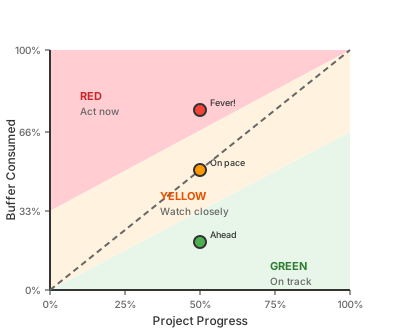
The dashed diagonal is your baseline. Points above the line mean you’re consuming buffer faster than you’re completing work—running a fever.
Reading the Chart
| Progress | Buffer Used | Position | Meaning |
|---|---|---|---|
| 25% | 10% | Below line | Ahead of pace—buffer healthy |
| 50% | 50% | On line | Exactly on pace |
| 50% | 70% | Above line | Behind pace—buffer draining fast |
| 75% | 50% | Below line | Strong finish likely |
| 90% | 95% | Above line | Likely to miss deadline |
The Three Zones
🟢 Green (below 1/3 line): Buffer consumption tracking well below progress. No action needed—the system is protecting the constraint.
🟡 Yellow (middle 1/3): Buffer consumption approaching progress rate. Monitor closely:
- Daily check-ins on blockers
- Identify what’s consuming buffer (scope creep? Dependencies? Rework?)
- Consider pulling the rope tighter (limit new work intake)
🔴 Red (above 2/3 line): Buffer consumption outpacing progress. Immediate action:
- Pull the rope hard: Stop starting new work
- Protect the constraint: Remove any blockers on critical path
- Reduce scope: Cut non-essential features to hit the deadline
- Escalate: If external dependencies are the cause, raise visibility
Connection to DBR
The fever chart operationalizes the “B” in DBR:
| DBR Element | Fever Chart Connection |
|---|---|
| Drum | Sets the pace you’re measuring against |
| Buffer | The Y-axis—what you’re monitoring |
| Rope | What you tighten when buffer enters yellow/red |
When the chart shows yellow, the rope should tighten—less work enters the system. When it shows red, the rope should stop—nothing new starts until the constraint clears its queue.
This is subordination in action: everything bends to protect the constraint’s buffer.
Where You’ll See It
- Sprint dashboards: Burndown charts with buffer overlay
- JIRA time tracking: Estimated vs. actual hours plotted over sprint progress
- Simple spreadsheets: Two columns (% complete, % time used) plotted weekly
The tool doesn’t matter. What matters is watching the buffer before it’s gone.
12. The Scorecard
Remember the math from §3? Little’s Law said Flow Time = WIP / Throughput. These four DORA metrics are how you know if the math is working in your favor.
The DORA-Little’s Law Connection
| DORA Metric | Little’s Law Lever | Why They’re Linked |
|---|---|---|
| Lead Time | Flow Time | Direct measurement of L = W/λ |
| Deploy Frequency | Throughput (λ) | How fast work exits the system |
| MTTR | WIP during incidents | Recovery = clearing unplanned WIP |
| Change Fail Rate | Hidden WIP (rework) | Failures create rework that inflates W |
When lead time rises, either WIP increased or throughput dropped—the metrics tell you which.
“We settled on four: delivery lead time, deployment frequency, time to restore service, and change fail rate.” (Forsgren et al., 2018, line 1235)
| Metric | Elite | High | Medium | Low |
|---|---|---|---|---|
| Lead Time | < 1 hour | < 1 day | < 1 week | > 1 month |
| Deploy Frequency | Multiple/day | Daily-Weekly | Weekly-Monthly | Monthly+ |
| MTTR | < 1 hour | < 1 day | < 1 day | > 1 week |
| Change Fail Rate | < 5% | < 10% | < 15% | > 30% |
(Forsgren et al., 2018, lines 1405-1433)
Measurement Methods:
- Lead Time: Ticket created → PR merged (JIRA workflow)
- Deploy Frequency: Deployments per week (CI/CD metrics)
- MTTR: Incident start → resolution (PagerDuty/incident logs)
- Change Fail Rate: Incidents / deployments (monthly)
What Good Looks Like:
| Practice | High Performers | Low Performers |
|---|---|---|
| Deployment | On demand, multiple per day | Monthly release train |
| Testing | Automated, in CI/CD | Manual, end of cycle |
| Branching | Trunk-based, short-lived | Long-lived feature branches |
| Review | Async, < 1 day turnaround | Waiting for scheduled review |
| Rollback | Automated, < 1 hour | Manual, multi-day |
| WIP | Limited (1-2 items/dev) | Unlimited (5+ items/dev) |
If lead time is dropping and failures are rare, you’re doing it right.
Reading the signals:
- Lead time rising? WIP is creeping up. Check how many things are “in progress” right now. WIP limits “ensure that teams don’t become overburdened (which may lead to longer lead times)” (Forsgren et al., 2018).
- Deploy frequency dropping? Look for batch size creep—”deployment frequency [is] a proxy for batch size” (Forsgren et al., 2018). Are PRs getting bigger? Is the review queue growing?
- MTTR climbing? Detection or resolution is slow. “Detect any issues quickly, so that they can be fixed straight away when they are cheap to detect and resolve” (Forsgren et al., 2018).
- Change fail rate spiking? Tests aren’t catching defects. “Effective test suites… find real failures and only pass releasable code” (Forsgren et al., 2018).
These metrics are symptoms. The levers are in §3.
13. Four Lenses, One Truth
Four frameworks, one truth: find the constraint, measure the flow, gate the quality, secure the path. Each answers a different question—but they all serve the same goal: sustainable flow.
| Framework | Question It Answers | Key Insight |
|---|---|---|
| TameFlow | “Where’s the constraint?” | Constraints limit throughput; optimize the bottleneck |
| DORA | “Are we improving?” | Four metrics predict organizational performance |
| ISO 9001 | “Did we check our work?” | PDCA cycle, design reviews, documented processes |
| PCI DSS | “Is it secure?” | Secure SDLC, patch management, script integrity |
How They Connect to Flow Theory
All four frameworks are flow interventions in disguise:
| Framework | Flow Theory Connection |
|---|---|
| TameFlow | Direct application. DBR operationalizes Little’s Law—the drum limits throughput to constraint capacity, the buffer absorbs variability, the rope limits WIP. |
| DORA | Measurement of flow outcomes. Lead time IS flow time. Deploy frequency IS throughput. MTTR and change fail rate measure flow disruptions. |
| ISO 9001 | Flow protection through quality. PDCA prevents defects that become rework (hidden WIP). Design reviews catch errors upstream where they’re cheap to fix. |
| PCI DSS | Security as flow constraint. Security requirements that aren’t built-in become emergency rework. Compliance gates that block flow should be automated. |
flowchart LR
    subgraph Speed["SPEED"]
        LT[Lead Time]
        DF[Deploy Frequency]
    end

    subgraph Stability["STABILITY"]
        MTTR[Mean Time To Recover]
        CFR[Change Fail Rate]
    end

    LT -.->|"trade-off?"| CFR
    DF -.->|"enables"| MTTR

    style Speed fill:#e3f2fd
    style Stability fill:#e8f5e9
The counterintuitive finding: Speed does NOT trade off with stability. The practices that improve speed (small batches, automation, fast feedback) also improve stability.
“The ability to deliver software with both speed and stability also reduce the stress and anxiety associated with pushing code to production.” (Forsgren et al., 2018, line 3846)
High performers showed:
- “440 times faster lead time from commit to deploy”
- “170 times faster mean time to recover from downtime”
- “5 times lower change failure rate”
(Forsgren et al., 2018, lines 1115-1121)
Together: Identify the constraint → measure the flow → gate the quality → secure the path.
14. The PDCA Connection
Every framework in this guide shares a common ancestor: the Plan-Do-Check-Act cycle.
flowchart LR
    P[PLAN] --> D[DO]
    D --> C[CHECK]
    C --> A[ACT]
    A --> P

    style P fill:#e3f2fd
    style D fill:#fff3e0
    style C fill:#e8f5e9
    style A fill:#fce4ec
“The PDCA cycle can be applied to all processes and to the quality management system as a whole.” (ISO 9001:2015, lines 343-345)
This mapping shows why the workflow phases exist and how they connect:
| PDCA | Workflow Phase | TameFlow | DORA | ISO 9001 |
|---|---|---|---|---|
| Plan | 1-2 (Research, Planning) | Identify constraint | Define targets | 8.1 Planning |
| Do | 3-5 (Implement, Verify, CI/CD) | Exploit, Subordinate | Execute | 8.5 Production |
| Check | 6-7 (Review, Complete) | Measure throughput | Track metrics | 9.1 Monitoring |
| Act | Retrospective | Elevate, Repeat | Improve | 10.3 Improvement |
The cycle explains why skipping phases fails:
- Skip Plan (phases 1-2)? You’re coding without understanding the problem—waste.
- Skip Check (phases 6-7)? You’re shipping without verification—risk.
- Skip Act (retrospective)? You’re repeating mistakes—stagnation.
PDCA isn’t a bureaucratic overlay. It’s the shape of effective work.
Manager Summary: You now have the measurement toolkit. The principle is simple: measure the flow, not the busy-ness.
Part III Summary: You now have the measurement toolkit—the feedback loop tells you what to watch (S10), the fever chart tells you when to act (S11), DORA metrics tell you if you’re improving (S12), the four frameworks show you where to look (S13), and PDCA shows you how to think about cycles (S14). The principle is simple: measure the flow, not the busy-ness.
We started with a paradox: teams that start less finish more. We traced it through the math—variability and the busy trap explain why 100% utilization kills flow. We built the system: TameFlow’s constraint-based approach with DBR, buffers, and fever charts to surface problems early. We walked through the method: 8 phases from research to release, with sizing as Phase 2 to keep batches under DORA’s ≤1 week ceiling. We connected the metrics: the four DORA keys map directly to Little’s Law, and all four frameworks (TameFlow, DORA, ISO 9001, PCI DSS) converge on the same principles.
What remains is the habit.
15. The One Thing to Remember
Metrics tell you if the system is working. But systems are made of habits. Here’s the one habit that matters most:
When in doubt, finish something before starting something new.
This single habit:
- Reduces WIP (Little’s Law)
- Improves lead time (DORA)
- Clears the constraint (TameFlow)
- Delivers value (ISO 9001)
“hyper-productivity can only be attained when the organization exhibits the Unity of Purpose and the Community of Trust patterns.” (Tendon & Muller, 2014, full-book.md, line 599)
None of this works without psychological safety. The DORA research (Westrum organizational culture model) shows that high-performing teams require a culture where people can report problems—including red fever charts—without fear. If “red” means blame, people will hide problems until they explode.
Flow efficiency beats resource efficiency. Now you know why.
Where to start: Pick one thing this week. Limit your personal WIP to 2. Track lead time for a few tickets. Try the fever chart on one project. Small experiments, fast feedback.
Appendices
Appendix A: Rosetta Stone
Cross-framework terminology mapping.
| Concept | TameFlow [1] | DORA/Accelerate [2] | ISO 9001 [3] | PCI DSS [4] |
|---|---|---|---|---|
| Flow Time | “flow time (FT)” Ch.14:104 | “delivery lead time” L.1235 | — | — |
| Throughput | “TP = Revenue − TVE” Ch.11:11 | “deployment frequency” L.1235 | — | — |
| WIP/Batch | “WIP” Ch.14:104 | “batch size” L.1309 | — | — |
| Constraint | Ch.12 | “bottleneck” L.7395 | — | — |
| Improvement | “Five Focusing Steps” Ch.12:72 | “continuous improvement” L.3637 | “continual improvement” L.1470 | “ongoing monitoring” L.105 |
| Feedback | “DBR” Ch.24:25 | “feedback loop” L.1309 | “PDCA cycle” L.343 | “vulnerability remediation” L.19 |
| Quality Gate | “buffer management” Ch.20:2331 | “change fail rate” L.1235 | “design review” 8.3.4 | “security testing” L.122 |
| Culture | “Unity of Purpose” full:599 | “Generative” L.1741 | “quality culture” 5.1 | — |
| Inventory | “work in process” Ch.11:49 | “work in progress” L.1311 | — | — |
| Recovery | “Step 5: Repeat” Ch.12:82 | “MTTR” L.1235 | “corrective action” L.1448 | “incident response” |
| Team Focus | “subordination” Ch.12 | “team autonomy” L.2815 | “competence” 7.2 | “developer training” L.68 |
| Traceability | — | — | “documented information” 7.5 | “script inventory” L.80 |
| Visibility | “fever chart” full:2331 | “continuous delivery” L.2153 | “monitoring” 9.1 | “script integrity” L.79 |
| Risk | “buffer consumption” Ch.20 | “change fail rate” L.1235 | “risk-based thinking” L.381 | “vulnerability” L.45 |
Legend:
Ch.X:Y= TameFlow chapter, line Yfull:Y= TameFlow full-book.md, line YL.Y= Source file line numberX.Y= ISO clause number- “—” = Framework doesn’t address this concept
Framework Relationships Diagram
flowchart TB
    subgraph Theory["TameFlow: THEORY"]
        T1[Five Focusing Steps]
        T2[Little's Law: FT = WIP/TP]
        T3[Constraint]
        T4[Unity of Purpose]
        T5[Buffer Fever Chart]
    end

    subgraph Metrics["DORA: METRICS"]
        M1[Lead Time]
        M2[Deploy Frequency]
        M3[MTTR]
        M4[Change Fail Rate]
    end

    subgraph Governance["ISO 9001: GOVERNANCE"]
        G1[Design Review 8.3.4]
        G2[PDCA Cycle 10.3]
        G3[Corrective Action 10.2]
        G4[Risk-Based Thinking 6.1]
    end

    subgraph Security["PCI DSS: SECURITY"]
        S1[Secure SDLC 6.1]
        S2[Security Testing 6.2]
        S3[Patch Management 6.3]
        S4[Script Integrity 6.4.3]
    end

    T2 -->|"WIP reduction"| M1
    T2 -->|"batch size"| M2
    T3 -->|"identify bottleneck"| M3
    T5 -->|"buffer consumption"| M4

    T1 -->|"Step 5: Repeat"| G2
    T4 -->|"shared vision"| G4

    M4 -->|"quality feedback"| G1
    M3 -->|"incident learning"| G3
    M1 -->|"process capability"| G4

    G3 -->|"fixes gate"| S3
    G1 -->|"review gate"| S1
    G4 -->|"risk assessment"| S2

    S2 -->|"blocks deploy"| M2
    S4 -->|"change detection"| M4

    style Theory fill:#e3f2fd
    style Metrics fill:#fff3e0
    style Governance fill:#e8f5e9
    style Security fill:#fce4ec
Appendix B: Compliance Checklist
ISO 9001:2015 Audit Checklist
| Clause | Requirement | Evidence | Status |
|---|---|---|---|
| 7.1.3 | Infrastructure | Dev environment docs | [ ] |
| 7.2 | Competence | Training records | [ ] |
| 7.5 | Documented information | Ticket history, PR records | [ ] |
| 8.3.3 | Design inputs | Issue reproduction docs | [ ] |
| 8.3.4 | Design controls | Solution design, code review | [ ] |
| 8.3.5 | Verification | Test results | [ ] |
| 8.3.6 | Validation | Production verification | [ ] |
| 8.5.1 | Production control | CI/CD pipeline | [ ] |
| 10.2 | Corrective action | Bug fix workflow | [ ] |
| 10.3 | Continual improvement | Retrospectives | [ ] |
PDCA Cycle Mapping
flowchart LR
    P[PLAN] --> D[DO]
    D --> C[CHECK]
    C --> A[ACT]
    A --> P

    style P fill:#e3f2fd
    style D fill:#fff3e0
    style C fill:#e8f5e9
    style A fill:#fce4ec
“The PDCA cycle can be applied to all processes and to the quality management system as a whole.” (ISO 9001:2015, lines 343-345)
| Phase | Workflow Mapping | TameFlow Equivalent | DORA Connection |
|---|---|---|---|
| Plan | Phase 1-3 (Research, Sizing, Planning) | Identify constraint | Define target metrics |
| Do | Phase 4-6 (Implement, Verify, CI/CD) | Exploit, Subordinate | Execute with automation |
| Check | Phase 7-8 (Review, Complete) | Measure throughput | Track metrics |
| Act | Retrospective | Elevate, Repeat | Improve based on data |
PCI DSS Requirement 6 Checklist
| Sub-Req | Description | Evidence | Status |
|---|---|---|---|
| 6.1 | Secure SDLC established | SDLC documentation | [ ] |
| 6.2 | Software security testing | SAST/DAST reports | [ ] |
| 6.2.1 | Code review performed | PR approval records | [ ] |
| 6.2.2 | Developer training | Training completion records | [ ] |
| 6.3 | Patches applied timely | Patch log (< 30 days critical) | [ ] |
| 6.3.2 | Software inventory maintained | SBOM | [ ] |
| 6.4 | Change control followed | Change records | [ ] |
| 6.4.3 | Payment page scripts managed | Script inventory + integrity | [ ] |
DORA Metrics Tracking
| Metric | Target | Current | Trend |
|---|---|---|---|
| Lead Time | < 1 week | ___ | ___ |
| Deploy Frequency | Weekly | ___ | ___ |
| MTTR | < 1 day | ___ | ___ |
| Change Fail Rate | < 15% | ___ | ___ |
Appendix C: Quick Reference Cards
TameFlow Quick Reference
THE FIVE FOCUSING STEPS
1. IDENTIFY → What's the constraint?
2. EXPLOIT  → Maximize its output
3. SUBORDINATE → Others yield to it
4. ELEVATE  → Add capacity if needed
5. REPEAT   → Find new constraint

LITTLE'S LAW
Flow Time = WIP / Throughput
↓ WIP = ↓ Lead Time

KEY INSIGHT
Flow efficiency > Resource efficiency
DORA Quick Reference
FOUR KEY METRICS
┌──────────────────┬──────────────────┐
│ SPEED            │ STABILITY        │
├──────────────────┼──────────────────┤
│ Lead Time        │ MTTR             │
│ Deploy Frequency │ Change Fail Rate │
└──────────────────┴──────────────────┘

ELITE TARGETS
Lead Time:      < 1 hour
Deploy Freq:    Multiple/day
MTTR:           < 1 hour
Change Fail:    < 5%
ISO 9001 Quick Reference
KEY CLAUSES FOR DEV WORKFLOW
7.1.3  Infrastructure (dev environment)
7.5    Documented information (tickets, PRs)
8.3.3  Design inputs (issue research)
8.3.4  Design controls (code review)
8.3.5  Verification (testing)
8.3.6  Validation (production check)
10.2   Corrective action (bug fixes)
10.3   Continual improvement (retros)
PCI DSS Req 6 Quick Reference
REQUIREMENT 6: SECURE SYSTEMS & SOFTWARE

6.1  Secure SDLC          → Threat modeling
6.2  Security testing     → SAST/DAST
6.2.1 Code review         → Security reviewer
6.2.2 Developer training  → Annual
6.3  Patch management     → Critical < 30 days
6.3.2 Software inventory  → SBOM
6.4  Change control       → Documented
6.4.3 Script integrity    → Enforced since March 31, 2025
Workflow Phases Quick Reference
PHASE 0: SETUP      → Environment ready, branch created
PHASE 1: RESEARCH   → Issue reproduced, root cause identified
PHASE 2: PLANNING   → Solution designed, tasks identified
PHASE 2.5: COORD    → Cross-team dependencies handled
PHASE 3: IMPLEMENT  → Code complete, tests written
PHASE 4: TEST       → All tests passing, no regressions
PHASE 5: CI/CD      → Pipeline green, checks passing
PHASE 6: PR REVIEW  → Approvals obtained, feedback addressed
PHASE 7: COMPLETE   → Merged, deployed, verified
Ticket State Machine
stateDiagram-v2
    [*] --> Open: Issue reported

    Open --> InProgress: Developer starts
    InProgress --> Open: Blocked/Reassigned

    InProgress --> InReview: PR created
    InReview --> InProgress: Changes requested

    InReview --> ReadyToDeploy: PR approved
    ReadyToDeploy --> InReview: Deploy blocked

    ReadyToDeploy --> Done: Deployed & verified
    Done --> [*]

    InProgress --> Blocked: External dependency
    Blocked --> InProgress: Dependency resolved

    note right of Open: Phase 0-1
    note right of InProgress: Phase 2-6
    note right of InReview: Phase 7
    note right of ReadyToDeploy: Phase 8 (pre)
    note right of Done: Phase 8 (post)
Appendix D: AI-Assisted Sizing
The Estimation Problem
Humans are systematically bad at estimating ticket size. The planning fallacy—underestimating how long tasks will take—is well-documented in cognitive psychology. Developers forget similar past work, anchor on optimistic scenarios, and can’t hold hundreds of historical patterns in their heads.
But the data exists. Every completed ticket has:
- A description and acceptance criteria
- An actual cycle time (start to done)
- Associated code changes (files touched, diff size, complexity)
- Context: what area of the codebase, what type of work
What AI Could Learn From
Historical tickets mapped to actual outcomes:
| Input | Output |
|---|---|
| Ticket description + affected code areas | Similar past tickets with actual cycle times |
| “Tickets touching module X” | “Average 1.8x their initial estimate” |
| Keyword patterns | “Tickets with ‘migration’ in title take 3x longer” |
What AI Could Output
At Phase 2 (Sizing), AI assistance could provide:
- Similar tickets: “This looks like tickets #142, #287, #301 which took 4, 6, and 5 hours respectively”
- Area-based adjustment: “Work in this area of the codebase averages 2x initial estimates”
- Confidence interval: “70% confidence this is ≤ 3 days, 30% it’s 4-7 days”
- Decomposition prompt: “Tickets this size have 40% chance of missing the 1-week ceiling—consider splitting”
Why AI Might Be Better
- No planning fallacy: AI isn’t doing the work, so it has no ego investment in optimistic estimates
- Pattern recognition at scale: Can identify correlations humans miss across thousands of tickets
- Calibrated confidence: Can learn from prediction errors and adjust
- Consistent application: Same heuristics applied every time, no mood-dependent variation
What You’d Need to Build This
- Historical data pipeline: Ticket → actual cycle time → code diff mapping
- Embedding similarity: Find “tickets like this one” based on description and code areas
- Codebase complexity metrics: Identify high-variance areas
- Calibration loop: Compare AI estimates to actuals, refine model
Current State
This is speculative—no off-the-shelf tool does this well yet. But the components exist:
- LLMs can understand ticket descriptions and code context
- Embedding similarity is well-understood
- Cycle time data is available in most issue trackers
Research shows promise: Choetkiertikul et al. (2018) achieved mean absolute error of 2.09 story points on industrial data using deep learning, and a 2024 study using SBERT with gradient-boosted trees showed 18% improvement over prior state-of-the-art (Yalçıner et al., 2024). However, models perform poorly on cross-project prediction—story points are too subjective and contextual to transfer between teams.
The opportunity is assembling these into a sizing assistant that augments human judgment at Phase 2, providing calibrated data instead of gut feel. The key constraint: you need your own team’s historical data, not a generic model.
Appendix E: Sources
Frameworks & Methodologies
-
Goldratt, E. M. & Cox, J. (1984). The Goal: A process of ongoing improvement. North River Press. — The origin of Theory of Constraints (TOC), presented as a business novel about a manufacturing plant manager learning to identify and exploit constraints.
-
Tendon, S. & Muller, W. (2014). Hyper-productive knowledge work performance: The TameFlow approach. TameFlow. — Applies TOC to software development; introduces Drum-Buffer-Rope for knowledge work.
Note on source synthesis: This rubric synthesizes multiple frameworks (TameFlow, DORA, Hopp & Spearman, ISO 9001, PCI DSS). These sources generally align but differ on some points:
- Batch sizing: DORA uses time-based ceilings (≤1 week); TameFlow prefers cognitive load and constraint impact
- WIP limiting: Kanban uses column WIP limits; TameFlow/DBR uses buffer-based replenishment signals
- Throughput: Common usage means completion rate; TameFlow means Revenue − TVC
Where sources conflict (notably on batch sizing), we frame these as experimentation opportunities. DORA and TameFlow genuinely disagree on whether time or cognitive load is the better sizing criterion. Track your own data and discover what works for your team.
-
TOCPA. (2015). SDBR (Simplified Drum–Buffer–Rope) and DBR (Drum–Buffer–Rope). TOCPA. — Formal definitions of DBR and S-DBR; clarifies that the rope controls material release timing, not demand arrival. [Citing Cohen, O. & Fedurko, J. (2012). Theory of Constraints Fundamentals.]
-
Forsgren, N., Humble, J., & Kim, G. (2018). Accelerate: The science of lean software and DevOps. IT Revolution Press. — DORA research; four key metrics; statistical validation of DevOps practices.
-
Kniberg, H. (2017). Multiple WIP vs One Piece Flow (video). YouTube. — Visual demonstration that even perfect multitaskers deliver 2-3x slower; with realistic context-switching, 5-7x slower.
Mathematical Foundations
-
Hopp, W. J. & Spearman, M. L. (2008). Factory Physics (3rd ed.). Waveland Press. — Mathematical foundations of production systems; Law of Variability; Law of Variability Buffering; Little’s Law applications. Summary
-
Gunther, N. J. (2002). “Hit-and-Run Tactics Enable Guerrilla Capacity Planning.” IT Professional, July/August 2002, pp. 40-46. IEEE. PDF — Introduces the universal scalability model; demonstrates spreadsheet-based capacity modeling.
-
Gunther, N. J. (2007). Guerrilla Capacity Planning. Springer. Ch. 1 “The Guerrilla Manual.” — Rules of thumb for capacity modeling; Little’s Law applications; C(N) universal law derivation.
-
Jain, R. (2012). Introduction to Queueing Theory (lecture slides). UC Berkeley Mini-Course. PDF — Formal treatment of Kendall notation, Little’s Law proof, Markov/Poisson processes.
-
Schwartz, B. (2016). The Essential Guide to Queueing Theory (Rev. 3). VividCortex. PDF — Accessible practitioner guide; hockey-stick curve; Erlang formulas; square-root staffing rule.
Standards & Compliance
-
International Organization for Standardization. (2015). Quality management systems — Requirements (ISO 9001:2015). ISO. — Quality management standard; requires documented procedures, continual improvement, PDCA cycles.
-
PCI Security Standards Council. (2024). Payment Card Industry Data Security Standard (PCI DSS v4.0.1). PCI SSC. — Security standard for payment card handling; Requirement 6 covers secure development practices.
-
HeroDevs. (2024). PCI DSS 4.0 Requirement 6: How to Develop and Maintain Secure Systems and Software. HeroDevs. — Practitioner guide to PCI DSS Requirement 6 compliance.
Development Practices
-
Fowler, M. (2006). Continuous Integration. martinfowler.com. — Authoritative source for CI practices; origin of 10-minute build guideline (XP).
-
Beyer, B., Jones, C., Petoff, J., & Murphy, N. R. (2016). Site Reliability Engineering, Ch. 4 “Service Level Objectives”. Google SRE Book. — Methodology for deriving monitoring thresholds from SLOs.
Batch Size & Story Splitting
-
Humanizing Work. (2020). The Humanizing Work Guide to Splitting User Stories. Humanizing Work. — Comprehensive guide to story splitting patterns; INVEST criteria; vertical slicing.
-
DORA. (2025). Working in Small Batches. DORA. — “Any batch of code that takes longer than a week to complete and check is too big.”
-
Fuqua, A. (2015). Agile Story Points: How Many Stories Per Sprint? LiminalArc. — Practitioner guidance: 5-15 stories per sprint, 1-3 days each.
-
Kelly, A. (n.d.). What is the right size for a User Story? Allan Kelly. — “Smaller is better… both are possible, both are the right answer.”
Batch Size Economics
-
Reinertsen, D. (2009). The Principles of Product Development Flow. Celeritas Publishing. — U-curve optimization: optimal batch size balances transaction cost against holding cost.
-
Fabók, Z. (2013). The Optimal Batch Size. — Accessible explanation of Reinertsen’s U-curve.
-
Innolution. (n.d.). U-curve optimization Definition. — Quick reference.
-
Siddiqi, Z. (n.d.). A Theory of User Story Sizing. — Transaction cost vs holding cost framework.
-
Michaels, P. (2017). Irreducible Complexity in Agile. — Some work resists decomposition.
AI-Assisted Estimation Research
-
Choetkiertikul, M., Dam, H. K., Tran, T., Pham, T., Ghose, A., & Menzies, T. (2018). A deep learning model for estimating story points. IEEE Transactions on Software Engineering, 45(7), 637-656. IEEE. — Achieved MAE of 2.09 story points using LSTM+RHN on 23,313 issues from 16 projects; cross-project prediction performs poorly (24-81% worse).
-
Yalçıner, B., Dinçer, K., Karaçor, A.G., & Efe, M.Ö. (2024). Enhancing Agile Story Point Estimation: Integrating Deep Learning, Machine Learning, and Natural Language Processing with SBERT and Gradient Boosted Trees. Applied Sciences, 14(16), 7305. MDPI. — SBERT-LGBM achieved MAE 2.15, 18% improvement over prior state-of-the-art; confirms models struggle with cross-project prediction.
Glossary
| Term | Definition | Source |
|---|---|---|
| Buffer | Time/capacity reserve before a constraint | TameFlow |
| Change Fail Rate | % of deployments causing incidents | DORA |
| Constraint | The bottleneck limiting system throughput | TameFlow/TOC |
| Continual Improvement | Ongoing effort to improve processes | ISO 9001 |
| DAST | Dynamic Application Security Testing | PCI DSS |
| Deploy Frequency | How often code is deployed to production | DORA |
| DBR | Drum-Buffer-Rope (TameFlow steering mechanism) | TameFlow |
| Exploitation | Maximizing output from the constraint without adding resources | TameFlow/TOC |
| Fever Chart | Visual showing buffer consumption vs progress | TameFlow |
| Flow Time | Time for work item to traverse the system | TameFlow |
| Generative Culture | Performance-oriented, high-trust culture | DORA/Westrum |
| Hockey-stick curve | Response time vs utilization graph showing nonlinear explosion | Schwartz |
| Law of Variability | “Increasing variability always degrades the performance of a production system” | Hopp & Spearman |
| Law of Variability Buffering | “Variability will be buffered by some combination of inventory, capacity, or time” | Hopp & Spearman |
| Lead Time | Time from code commit to production | DORA |
| M/M/1 | Single-server queue with Markovian (random) arrivals and service times | Jain, Schwartz |
| MTTR | Mean Time to Recover from incidents | DORA |
| PDCA | Plan-Do-Check-Act cycle | ISO 9001 |
| SAST | Static Application Security Testing | PCI DSS |
| SBOM | Software Bill of Materials | PCI DSS |
| Stretch factor | R/S = 1/(1-ρ); how much response time exceeds service time | Schwartz |
| Subordination | Aligning non-constraint work to support the constraint | TameFlow/TOC |
| Throughput | Rate of value delivery | TameFlow |
| Universal Scalability Law | C(N) = N / [1 + αN + βN(N-1)]; quantifies scalability limits | Gunther |
| WIP | Work in Process/Progress | TameFlow/Lean |
Document generated with assistance from Claude Code.